

An AI that speaks computer
Describe the fault in your own words. The assistant runs the right checks, reads the results and explains what is going on - in plain words, no jargon.
 ⚡ AI-powered smart diagnostics
One app that checks your PC end to end - hardware, software, network, display, audio and temperatures - explains in plain words what is fine and what is not, and walks you step by step to the fix.
The tools of a computer lab, in an interface anyone can use.
Describe the fault in your own words. The assistant runs the right checks, reads the results and explains what is going on - in plain words, no jargon.
CPU, memory, disk, network, printers and temperatures at a glance - with a health score and an alert the moment something goes out of its normal range.
Device discovery, a Wi-Fi map, speed test, port and service scanning, ping, traceroute and an SSH console - all in a clear graphical view.
Display and colours, speakers and surround channels, microphone, keyboard and mouse - the checks a technician would run in the lab, one click away.
A complete snapshot of hardware, software and the operating system - to save, print or send to a technician in one click.
Every check runs locally on your machine and the results are never sent to any server. The only thing we keep is the details you chose to give us at sign-up.
A controlled load on the processor, memory, graphics card, drive and audio - with a live graph, an automatic cut-out if temperatures climb too far, and a report saved for every run. That is how you learn whether a machine is genuinely stable, and not only stable at rest.
Colour, geometry, sharpness and motion tests, checks written for OLED and LED panels, an HDR switch for each monitor, and a tool that tries to free a stuck pixel - all on your own screens, without unplugging anything.
One pass over Defender, the firewall, drive encryption, user account control, Secure Boot and the machine’s accounts - returning a score and a list of what to fix. Every finding has a button that opens exactly the right settings page, and a check that needs administrator rights says so instead of reporting that all is well.
Design capacity against today’s capacity, the charge-cycle count and a wear graph over time - so you can see whether the battery is genuinely failing or it only feels that way. Alongside it, which programs and components draw the most power, and what is keeping the machine from going to sleep.
Before the meeting rather than during it: the camera with a live preview and its real resolution and frame rate, the microphone with a level meter, the speakers, and a network stability check - each with a clear answer. It all runs on your own machine, and no image or recording ever leaves it.
Not another list of numbers. It checks the router, the ISP line, DNS, packet size, proxy settings, the hosts file and even the system clock - then says in one sentence whether the problem is in your home or at the provider, and what to do about it. A separate slow-line check measures the connection while it is under real load, because "it freezes when someone downloads" is a fault you can measure.
The complete list - 133 features inside the app, grouped by the screen each one lives on. Pick a subject on the side, or simply scroll.
The list grows with every version - and everything here is in the app's own search box too.

No technical knowledge needed. The software does the heavy lifting while you follow clear, plain-language guidance.
A lightweight download for Windows 10/11 - no mandatory signup, no credit card. A short wizard sets language, theme and the AI connection in under a minute, and every step can be skipped.
Type what is bothering you in plain words - "my PC is slow", "the internet keeps dropping". The assistant understands the context and asks only what it needs.
The software checks CPU, memory, disk, network, temperatures and running processes, spots what is out of its normal range and explains the findings in words anyone understands.
Get step-by-step instructions, and learn along the way how to handle it yourself next time. Need a human? Export a full report and send it to a technician.
A clean, modern interface built to be clear. Every screen is made so that people who do not know computers feel at home, and the people who do get all the depth they need.
Describe the problem in your own words; the assistant runs the right checks and explains what it found.
Live system health readings - CPU, memory, disk, network and printers - with an overall score and alerts that appear by themselves when something goes out of its normal range.
Scans the network and shows every connected device, alongside a Wi-Fi map, speed test, port scanning and ping/traceroute - clear graphical results, with a full console for power users.
A complete hardware and software snapshot - CPU, memory, GPU, drives, installed software and the OS - to save, print or send to a technician in one click.
Upgrade and maintenance walkthroughs that first check what you actually have - free memory slots, the right SSD - and only then explain step by step, so next time you can handle it yourself.
Load the components and watch, live, how much work each one is doing and how hot it gets. If a temperature goes too far the run stops by itself, and a report with the result for every component is saved at the end.
Your monitors are drawn exactly as they sit on the desk, with an HDR switch for each and tests that run on the screen you pick - including checks written for OLED panels and stuck pixels.
A live camera preview with the resolution and frame rate actually measured off it, a level meter for the microphone, a tone for the speakers and a network stability check - each with a clear answer of its own, and one closing sentence that says whether the machine is ready for the meeting. It all runs on your own machine, and nothing is recorded.
A single score at the top sums up eight areas - antivirus, firewall, disk encryption, user account control, Secure Boot, the machine's accounts, network exposure and saved Wi-Fi networks - and under it every finding stands on its own, with a button that opens exactly the settings page that fixes it. The check only looks and reports: nothing changes without a click from you.
What is actually shared on your network: the scanner walks every device and finds drives, folders, printers and services - not only Windows shares but SFTP, HTTP, UPnP and WSD too - listed under the machine hosting them. Clicking a share opens it in File Explorer or the browser, and every scan is kept so you can see what changed.
One press goes over eleven subjects - network, memory, processor, heat, storage, services, devices and stability - and comes back with a list of what is wrong, ranked by severity, each finding beside the measurement it was raised on.
No need to know what the fault is called or which screen to open: describe the problem in plain words, the AI runs the app's own checks, explains what it found and why, and offers a repair - which runs only when you press it, and is checked afterwards.
It checks the way a network technician does - from the cable and the Wi-Fi, through the address, the router and DNS, to the site, the shared folder or the server - and explains in plain words what happened, where, and what to do.
You tell it in your own words what to do. It finds what you asked for, shows you exactly what it found, and acts only once you have said yes.
It is very easy to write "all clear" about a place nobody looked at. Every tool in this category does it, and that is exactly what makes them worthless. Here, not knowing is written down as not knowing.
Firmware, serial number, interface, the speed it actually linked at against the speed it is capable of, and everything it has gathered since the day it was made - how much has been written to it, how many hours it has run, and how many times it lost power without closing properly. All of it read from the drive itself, with nothing to install and no administrator rights.
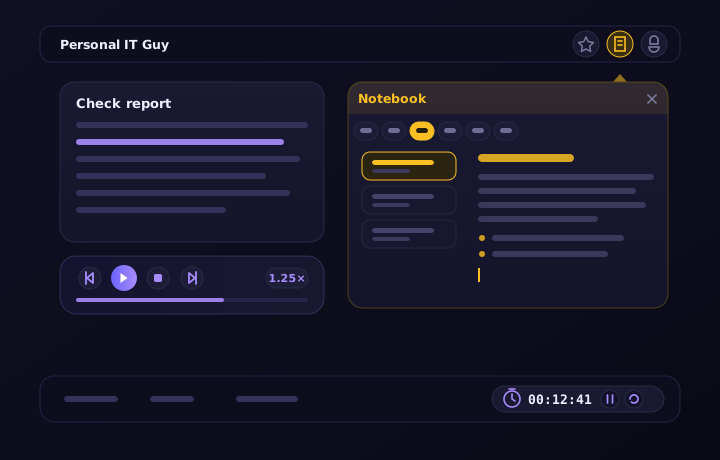
None of them asks you to stop what you are doing. The notebook opens over the screen, the report is read to you while you carry on working, and the clocks at the foot of the window count for you.
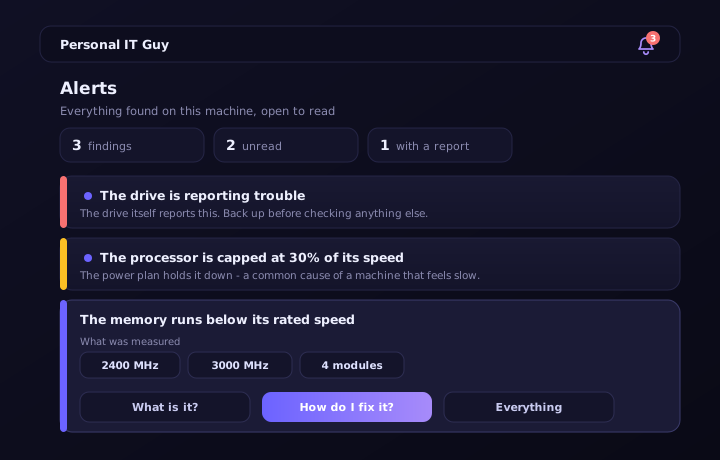
Fourteen checks run in the background and speak only when there is a reason. Every finding opens with the readings behind it, an explanation of what it means, and a repair guide written for this machine.
A digit code the app asks for every time it opens. The checks you ran, the reports you saved and your AI key stay yours - on a family computer, at a reception desk, or on a bench in a workshop.
Whether the site answers, when its certificate expires, who owns that address, and who can send a letter in your domain's name. All measured from your machine against the server itself - with no outside scanning service, and nobody receiving the list of sites you checked.
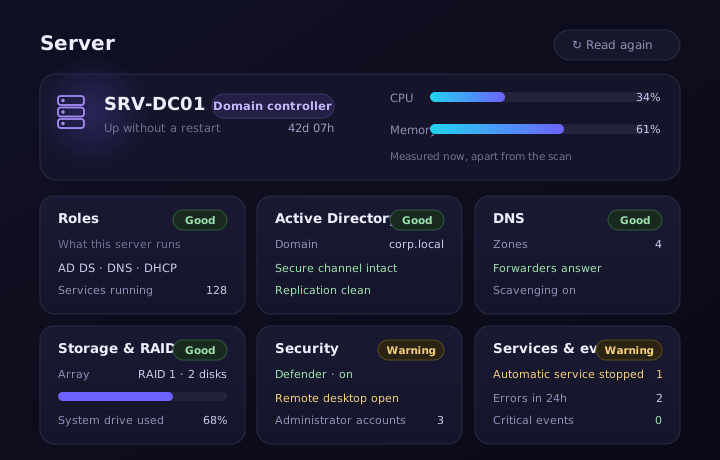
The app recognises a Windows Server on its own and opens a screen of its own: what the server runs, whether the domain is working properly, and how DNS, storage, security and events are doing. Every area gets a clear answer - what is fine, what needs attention and what is worth checking - with no console screens or tables to decode.
The scan runs once per launch and is kept; the live readings carry on beside it - so looking at the screen does not weigh on a server that is working.
One board that sees every machine you are responsible for - who is reporting, who is off, and what is happening on each of them right now. There is nothing to install at the other end and no hole to open in a firewall: the machine reaches out by itself, and only after it was allowed to.
Beyond the software, we provide professional IT services for businesses and private customers.
A technician connects to your machine, diagnoses and fixes - without you leaving home or hauling the computer to a lab.
Management, maintenance and security for your business IT - workstations, servers, network and backups.
Personal guidance on choosing equipment, planning upgrades, and training for your team.
Images are for illustration
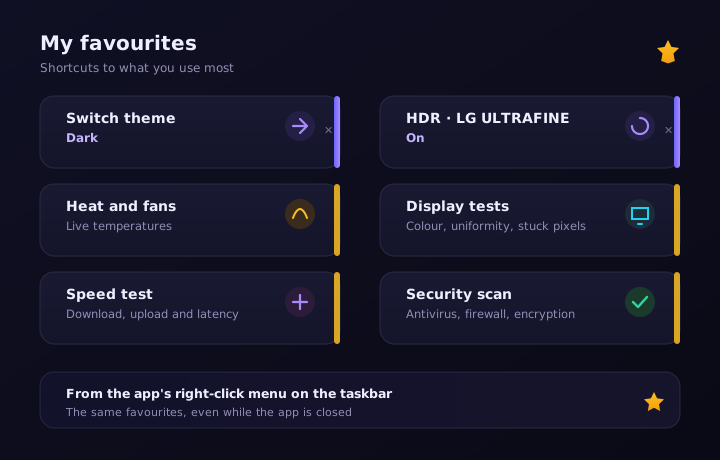
A star beside any screen, setting or test - and it is on your favourites screen. Whoever checks heat and drives every morning gets there in one press instead of looking for them again each time.
Download now, free, and start taking care of your PC yourself.
Free download for Windows
No mandatory signup • Windows 10/11 • AI features need your own Gemini key
Version 1.0.481 · 87.6 MB
Statement updated: September 14, 2026
This statement covers both of the services we provide, and not just one of them:
Everything set out below was tested and corrected in both systems. An accessibility enquiry can be made about either of them, through the same contact details.
At Personal IT Guy we treat accessibility as a basic right, not a perk. We work so that every person, including people with disabilities, can browse the site and use the software comfortably, independently and with dignity.
Accessibility work follows the Israeli Equal Rights for Persons with Disabilities Law, 1998, and the Equal Rights for Persons with Disabilities (Service Accessibility Adjustments) Regulations, 2013.
The site is subject to Israeli standard IS 5568, "Web content accessibility guidelines", which is based on the W3C's WCAG guidelines, at Level AA.
Computer software is not a "website" as the regulations define one, so the standard does not apply to it directly. The duty to make the service itself accessible does apply to it, however, and we have therefore made the software accessible on the same principles and to the same requirements of IS 5568 at Level AA, so far as they can apply to software installed on a computer.
The site and the software were made accessible to Level AA. The testing was carried out by the service operator, not by an external certified accessibility surveyor, with a combination of automated code testing and manual testing:
On the site: an accessibility button (♿) in the corner of the screen opens a personal-adjustments menu - increasing and decreasing the text size (up to 150%), high contrast, negative contrast, grayscale, link highlighting, a readable font, an enlarged cursor, stopping animations, and resetting. Your choices are saved in the browser and follow you between pages and on later visits. The menu is keyboard accessible and closes with Esc.
In the software: a dedicated accessibility menu offering larger text, high contrast, inverted colours, grayscale, link highlighting, heading highlighting, keyboard-focus highlighting, an enlarged cursor, wider text spacing, a reading guide, stopping animations, and resetting the settings. The choices are saved on the computer and loaded again at every launch.
We keep fixing and improving, and treat accessibility as an ongoing process rather than a finished task.
If you run into a difficulty, a fault or an element that is not accessible - on the site or in the software - we want to know and will fix it promptly. To help us act quickly, please say whether it is the site or the software, which page or screen, what you were trying to do, and what you were using (browser, screen reader and so on).
You may also request an accessibility adjustment, not only report a fault: if the way the service works does not suit you, tell us what would help and we will do what we can to provide it another way. If the contact details above do not suit you, you may reach us by any other means convenient to you - including through somebody acting on your behalf - and we will adapt how we respond.
Accessibility contact: Ronen Peleg
Email: info@pitguy.com
Usual response time: 5 business days.
Support services are provided remotely and by online means, with no need to travel to an office. You can reach us through the contact details in section 9, or by any other means convenient to you, and we will adapt how we respond to what you need.
We would be glad if you came to us first - most requests are settled quickly. Alongside that, you are entitled at any time to approach the Commission for Equal Rights of Persons with Disabilities at the Ministry of Justice, under the Equal Rights for Persons with Disabilities Law, 1998.
Last updated: October 02, 2026
Welcome to Personal IT Guy. These Terms of Use (the "Terms") govern your use of the Personal IT Guy software (the "Software"), its website (the "Site") and the related services. Please read them carefully - using the Software or the Site constitutes full acceptance of these Terms. If you do not agree with them, do not use the Software and uninstall it.
Scope - both systems:
These Terms apply to both. A clause that applies to only one of them says so in its heading.
Service operator: Personal IT Guy.
Email: info@pitguy.com
Use is permitted from age 18, or with a guardian's consent. By installing or using the Software you confirm that you have read, understood and accepted these Terms. If you use the Software on behalf of a business or organisation, you represent that you are authorised to bind it to these Terms.
The Software is a tool for diagnosing and testing a personal computer: hardware, operating system, installed software, storage, network, display, audio, input devices and temperatures. It presents information, explains it in plain language and suggests recommendations and remedial steps, alongside an AI-based assistant and guided walkthroughs.
The Software is not antivirus software, does not perform data recovery, and is not a substitute for inspection, diagnosis or individual advice by a qualified technician. Whether to act on any recommendation is your decision and your responsibility.
We grant you a personal, limited, non-exclusive, non-transferable and revocable licence to use the Software for private or internal-organisational purposes. You may not copy, distribute, sell, rent, sub-license, modify, decompile, reverse-engineer or create derivative works from the Software, except to the extent expressly permitted by law. You may not remove or obscure ownership, copyright or credit notices.
As of the date of these Terms, the Software is available to download and use free of charge. We may in future introduce paid versions, features or plans. Charging will not apply retroactively to a version already installed on your machine, and the payment terms, price and cancellation rights will be presented explicitly and in advance before any transaction. Any paid transaction concluded at a distance is subject to the Israeli Consumer Protection Law, 1981, and its regulations, including as to disclosure, cancellation and refunds.
The AI capabilities require separate approval of the "Use of AI" document, and your own personal API key for the Google Gemini service:
Some tools only present information, while others let you act on the system - ending a process, changing a setting, disabling a startup item or running a command. Those actions are performed by you, with your consent, and at your responsibility.
Remote monitoring. The Software includes an option, off by default, that lets the administrator follow the machine remotely and carry out a fixed set of actions on it. It opens only after explicit approval on the consent screen inside the Software - or, on an agent-only installation, in the window by the clock - and the typing of a username and password. Whoever switches it on confirms that they are entitled to do so on that machine - as its owner, or with the owner's authority.
Agent-only installation. The Software can be installed as "agent only", which runs in the background and shows the computer's users an icon by the clock (which the user can hide while the computer is connected to monitoring). Monitoring in it is switched on only by signing in from the icon with a username and password, after explicit approval in the window it opens, where the sync can also be paused and the computer disconnected. Whoever switches monitoring on for a computer that others use represents and undertakes: that they, or the organisation on whose behalf they act, are authorised to monitor the computer; that the computer's users will receive clear notice of the monitoring, its scope and its purpose before or when it begins; and that the monitoring will be used in accordance with all applicable law, including the law on employee privacy and monitoring in the workplace, and only for legitimate purposes of managing and maintaining the computer. Responsibility for all of these rests with them, or with the organisation on whose behalf they act, who will indemnify us against any claim arising from their breach.
The actions the administrator can carry out remotely are listed in the privacy policy (section 4.8) and are shown in the Software itself, before consent and after it. The administrator cannot run other commands, see the screen or reach files.
Nothing in remote monitoring makes us responsible for the machine's condition, its availability, or for backing up what is on it.
The Software includes tools for network scanning, device discovery, port scanning, service probing and remote connections (SSH/Telnet/ADB). You may use them only on networks and devices you own or have explicit permission to test. Using these tools against someone else's network or device without permission may constitute an offence under the Israeli Computers Law, 1995, and other laws - and full responsibility for that lies with you.
You may not use the Software or the Site for any unlawful or harmful purpose; infringe third-party rights; attempt to disrupt, circumvent or breach security mechanisms of the Software, the Site or any other system; use the Software to collect information about others without their permission; or use the service in a way that places an unreasonable load on it.
The Software checks our server for a newly published version and lets you install it. An update is performed only after your approval. We may discontinue support for older versions, and may change, add or remove capabilities from time to time.
The Software uses third-party components and open-source libraries, each subject to its own licence. The list of components and licences is shown in the "About" screen and in the files shipped with the Software. Nothing in these Terms derogates from the terms of those licences.
The remote support, business IT and consulting services offered on the Site are not part of the Software. They are provided separately and by prior arrangement, and their terms and prices are set out in a separate agreement or quotation. Remote access to your machine will take place only with your consent, in your presence, and by means agreed in advance. These services are distinct from the remote monitoring in section 6: monitoring runs with nobody present at the machine, and gives no access to the screen or to files.
All rights in the Software, code, design, interface, content, name and marks belong to the service operator or its licensors. They may not be used commercially or otherwise without prior written permission.
The Software, the Site, the information and the recommendations are provided "AS IS" and as available. We invest effort in accurate and reliable information but make no warranty, and are not liable for any direct, indirect, incidental, special or consequential damage - including data loss, lost profit, downtime or hardware damage - arising from use of the Software, reliance on its information or performing an action it recommended. Our total liability, on any cause of action, shall not exceed the amount you paid us for the Software in the twelve months preceding the event. Nothing here derogates from non-waivable statutory rights, including under the Israeli Consumer Protection Law, 1981.
If we suffer damage, loss or expense (including legal fees) as a result of your use of the Software in breach of these Terms or of the law, you will indemnify us for it.
We do not guarantee continuous availability of the Site, the update servers or related services. We may suspend or discontinue the service, in whole or in part, for operational or legal reasons. You may stop using it at any time by uninstalling the Software.
We may update these Terms from time to time. The updated version will be published on this page with the update date at the top; a material change will also be brought to your attention inside the Software. Continued use after an update constitutes acceptance of the updated version.
These Terms are governed solely by the laws of the State of Israel. Exclusive jurisdiction over any related dispute lies with the competent courts of the Tel Aviv-Yafo District.
If any provision of these Terms is held unenforceable, the remaining provisions stay in force. Failure to enforce a right is not a waiver of it. These Terms, together with the Privacy Policy and the Use of AI document, constitute the entire agreement between us regarding the Software.
For questions or clarifications regarding these Terms: info@pitguy.com.
Last updated: October 04, 2026
This Privacy Policy explains what information is collected when you use the Personal IT Guy software (the "Software") and its website (the "Site"), where it comes from, why it is collected, to whom it may be disclosed, how long it is kept and what rights you have over it.
It is written in accordance with the Israeli Protection of Privacy Law, 1981, including the Protection of Privacy Law (Amendment No. 13), 2024, and the regulations enacted under it - chiefly the Protection of Privacy (Data Security) Regulations, 2017, and the Protection of Privacy (Transfer of Data to Databases Abroad) Regulations, 2001.
This policy covers both. Where the two differ, it says so explicitly.
What is not here, and is better said up front: there is no online sale, no card processing, no marketing mailing list, no paid advertising, no pixels, no analytics tooling and no audience targeting - neither on the Site nor in the Software. The service is not built on collecting information, so the amount of information it collects is deliberately small.
Service operator and owner of the database: Personal IT Guy.
Address: Rishon LeZion, Israel
Email: info@pitguy.com
The contact person for privacy matters is the service operator. Every privacy enquiry is handled by them directly, at the email address above.
Amendment 13 to the Protection of Privacy Law, which came into force on 14 August 2025, abolished the duty to register most private databases with the Database Registrar and replaced it with internal management and documentation duties. Our database is not one of the kinds that remain registrable: its main purpose is not collecting information in order to pass it to others, it does not belong to a public body, and it does not hold specially sensitive information about a large number of people.
The scale of the activity and of the data also does not require appointing a data protection officer or a data security officer. That said, we keep the internal documentation the law requires, including a database definitions document, and we work to the data security regulations at the security level that applies to us.
Every check the Software runs - processor, memory, drives, graphics card, battery, network, temperatures, processes, services, installed software, display, audio, camera, microphone, input devices, machine security and the server tools - runs locally on your computer. Its results, the reports, the chat history and the settings are stored on your machine only.
We do not scan your computer remotely, we do not run commands on it remotely, we do not upload files from it, we do not see its contents, and we do not know what you checked, when, or what came out of it. The Software does not transmit results automatically, and it collects no usage data (telemetry) of any kind.
The one exception is remote monitoring (section 4.8) - an option that is off by default, and runs only on a machine where you explicitly switched it on and signed in with a username and password - and only until the monitoring is stopped. On such a machine, and only there, the Software reports the machine's state to our server and carries out a fixed set of actions the administrator asks for. On a machine where remote monitoring was never switched on, everything in the paragraph above holds in full.
The Software keeps an encrypted settings file in your user's own data folder. Among other things it holds:
Not one item on that list is sent to us or backed up by us. The reports the Software produces never include the settings file - so no API key, no conversation history and no console accounts.
Please note: a report you choose to send to a technician or anyone else does contain your machine's hardware and software details, and who receives it is entirely under your control.
Provided by you in the setup wizard.
A full name and an email address are required to complete the wizard, and the email address serves as your user identifier. Phone number, business name and headcount are optional and may be left blank. The details are stored in our database together with the date you registered.
Created in the course of use.
If an email address was provided, it is sent to our server each time the Software starts in order to update your last-used date. That is all that is recorded: the email address and the latest timestamp. We do not record what you did in the Software, which screens you visited or which checks you ran.
Collected automatically.
The Software contacts our server to check whether a new version has been published, to fetch system messages, to read operational settings and to show the legal documents in their current wording. As with any browsing, these requests expose your IP address, the time of the request and its technical details, and they are written to the server log for operations and security.
Provided by you.
If you send feedback from within the Software, what reaches us is the kind of enquiry, the text you wrote, your name and email address if you filled them in, the version number, the operating system, the interface language and the screen the message was sent from - along with a screenshot, if you chose to attach one. The message reaches us as an email and is not stored in the database.
Screenshots: a screenshot may include personal information that happened to be on screen at that moment. Attaching it is your choice, and it is worth checking what is visible in it before sending.
To prevent abuse of the form we keep a send-rate counter identified by a one-way hash of the IP address, which deletes itself after a day.
Provided by you.
We keep the enquiry and the contact details in it in order to handle it and to record how it was handled.
Created in the course of use.
When the Software checks who owns a domain or an IP address, it asks the authorised registry directly. Only when the network you are connected to blocks that direct request does the query pass through our server, which forwards it to the registry. In that case the query is exposed to our server in passing only and is not stored.
A lookup of your public IP address is answered from tables held on our own server rather than against an outside location service - precisely so that no outside party receives a list of which users were online and when.
For the service operator only.
It holds a username, a password as a one-way hash, the last sign-in time, "remember me" tokens and a failed-login counter keyed by IP address. There are no outside users in this area.
Sent from the machine, only after it was explicitly switched on.
The Software includes an option, off by default, to report the machine's state to our server so that the administrator can follow it remotely and receive alerts. It is switched on only if you explicitly approved it on the consent screen inside the Software - or, on an agent-only installation, in the window by the clock - and typed a username and password you received from us.
Agent-only installation. The Software can be installed as "agent only". It then runs in the background with no window, for every user who signs in, and shows an icon by the clock. While the computer is connected to monitoring, whoever uses it can hide the icon from the window by the clock, and the window then opens from the Start menu; disconnecting from monitoring brings the icon back. The installation itself does not switch monitoring on: monitoring is switched on only when someone at the computer signs in from the icon with a username and password, after reading in the window what is sent and what the administrator can do - as set out in this section - and confirming that they are authorised to switch monitoring on for the computer and that its users will know it is monitored. From the same window the sync can be paused and resumed at any moment - while it is paused nothing is sent and no actions are carried out, and the monitoring dashboard shows that the user paused it - the computer's name on the dashboard can be changed, sending the location can be switched off (section 4.9), the notices about remote actions can be switched off (see "A notice to whoever sits at the computer" further on in this section), the icon can be hidden, and the computer can be disconnected from monitoring. What is sent and the possible actions are the same as in monitoring switched on from inside the Software, and nothing more is collected. Whoever switches monitoring on for a computer that others use - an employer or an IT service provider, for example - is responsible for being authorised to monitor it, and for its users having been duly informed, including under the law that applies to monitoring in the workplace.
While it is on, the Software checks with the server every few seconds whether the administrator is watching the machine (that check sends no data), and tells the server in a single word when it closes, when the machine goes to sleep or when it shuts down (that word carries no data either).
The routine report is sent every few minutes - and every few seconds while the machine is being watched - and carries: processor load, memory in use, free space on each drive, network rate, time since power-on, the name of the program using the most processor, the processor, graphics card, motherboard and drive temperatures and the graphics card load where they are measured, whether a restart is pending, the notices the Software itself shows in its bell when they change, the Software version, the machine's address on its own network, its time zone and its own time, whether the Software is locked with an entry code, how long it has been since a key or the mouse was last touched at the machine - a length of time and nothing else, which shows whether somebody is sitting at it and never what was typed, in which program, or by whom - and the answers to the actions the administrator asked for, where there are any.
The hardware and software description is sent every 4 hours, and whenever the administrator asks, and carries: the machine's name and the Windows user name, the email address entered in the Software, machine and board model, processor, memory, drives (including serial numbers), graphics card, battery if there is one, the Windows version and which of its features are on, protection state (Defender and the firewall), whether an update is pending, the number of installed programs, the list of installed programs (name, version, publisher, when the program was last opened and how many times, the date on the program's own file, and whether it can be repaired or removed silently from the dashboard) and which of them winget can update, the notices the app itself shows in its bell, the last Computer Doctor score, how the Software is installed on the machine - for every user or for one, and whether the helper service is running, and the hardware (MAC) addresses of the machine's physical network adapters, so that it can be woken remotely (Wake-on-LAN) without a check having been run on it first. When a program was last opened is read from the record Windows itself keeps of programs started from the Start menu, the taskbar or a double click, for the user the Software runs as. What was done inside a program, how long it was open, and which files were opened in it are not collected.
What is never sent: files, browsing history, passwords, document contents or screenshots.
The data is encrypted in transit and stored encrypted on our server, and it is seen by the administrator and, for the machines they connected with them, by whoever received a username and password from us.
AI analysis on the monitoring dashboard. Whoever can see the machine on the monitoring dashboard can press "Explain" or "AI analysis" beside a process, a service, an installed program or an event-log line, or beside the result of a check - the computer doctor, the network check, the heat check, the printers, the system file check, the reliability report or the machine's overall state. Only then, and only the data of that one item or result, is sent from our server to the Google Gemini service to obtain an explanation. Before it is sent, the computer's name, the Windows user name (including inside file paths), the domain name, e-mail addresses, the network's public address, hardware (MAC) addresses, serial numbers, the wireless network's name and location details are removed from it. Nothing is sent to the AI by itself or on a schedule - only on a press. Details in section 6.
A helper service on the machine. When monitoring is switched on with a username and password, or on an agent-only installation, a Windows service named "Personal IT Guy" is installed on the machine as well. It is needed for the things the operating system does not allow without administrator rights - installing updates, reading drive temperatures, updating the Software itself, carrying out the repairs from the Software's fixed list that the administrator asked for (resetting the network settings or restarting a device, for example), and a handful of checks that have no answer without it. Windows asks for administrator approval once, at installation (on an agent-only installation, with the approval already given to the installation itself). The service runs a fixed list of predetermined operations and collects nothing of its own; everything sent from the machine is what this section describes. It is removed when monitoring is stopped or the Software is uninstalled; on an agent-only installation it stays until the Software is uninstalled, so that signing in again does not need another administrator approval.
The actions the administrator can ask for remotely, and these are all of them:
The administrator cannot run other commands, see the screen or reach files.
A notice to whoever sits at the computer. When the administrator asks for an action from the list above, a notice appears on the computer, by the clock, saying that the technician is working on the computer and which action it is; clicking it opens a window that shows what is running right now, for how long, and what was done before. The notice also has a "Technician's details" button, which shows the administrator's name, company, phone and email as they entered them in their profile on the monitoring dashboard (or Personal IT Guy's contact details, when the computer is monitored by us), as long as the administrator has not switched this off in their monitoring dashboard's settings. The notice is shown as long as the administrator has not switched it off in their monitoring dashboard's settings, and whoever uses the computer can switch it off in the Software's monitoring settings or in the window by the clock. The notice is shown on the computer only and sends no information. Switching the notice off does not release whoever switched monitoring on from their duty to inform the computer's users, as set out in the paragraph "Agent-only installation" above.
Admin log. Every action the administrator asks for from the list above is also recorded in a log kept on the machine itself: what was done, on what, when, how it ended, and the name of the dashboard user who asked for it. The log stays on the machine and is never sent anywhere; it opens from the window by the clock or from the monitoring settings in the Software, only with a code, and holds up to the last 500 actions from the last six months.
You can stop monitoring at any moment from the same screen in the Software; stopping deletes the identification key from the computer and tells the server, and the administrator can also remove the machine from their side. The Software shows exactly what is sent, before consent and after it. On an agent-only installation the computer is disconnected from the window by the clock, where the sync can also be paused for a while; uninstalling the Software from the computer stops the monitoring at once.
Sent from the machine, only while monitoring is on.
So that the administrator can tell where each machine on their list is, the report also carries the place the machine is in: a country, a region and a city, and nothing finer. This clause applies only to machines on which you switched remote monitoring on under section 4.8, and only while it is on; on a machine without remote monitoring no location information is collected or sent at all.
All of it can be switched off. The settings screen inside the Software carries a switch, in the "The machine’s location" row - and on an agent-only installation, the window by the clock - that stops everything in this clause: the position is neither measured nor sent, the Software does not ask Windows for a position at all, and Windows does not contact Microsoft’s location service on this machine’s behalf. The report carries an explicit refusal, so the machine is not given a position by another of your machines on the same network either (see below). The administrator’s screen then shows the internet address alone - the same address every website you visit can see - and nothing else about the report changes. The switch can only be turned back on at the machine itself.
The place is worked out in this order:
When Windows' location service is the source, the coordinates are sent to our server, matched there to the nearest place name from local tables held on the server, and deleted immediately afterwards - they are not stored, not displayed and not passed to anybody; what is kept is the name of the place only.
A reading whose accuracy is worse than five kilometres is not treated as a position and is not sent at all - a machine with no Wi-Fi and no receiver is given a circle tens of kilometres wide by Windows, which is an answer about a country rather than a location.
Windows' location service is Microsoft's: when it derives a position from the wireless networks around the machine, the operating system itself contacts Microsoft's location service - that is Windows doing its own work, not our Software. You can switch location access off at any moment in the Windows settings, and the place is then worked out by the other means.
The Software's monitoring settings say which of them the current answer came from. That screen also shows the point that was measured and can open it on Google Maps - opening the map is your own request to Google from your own browser, not a request made by the Software.
In accordance with the disclosure duty in section 11 of the Protection of Privacy Law we clarify: you are under no legal obligation to give us any information, and providing it is done of your own free will and with your consent. That said, a full name and an email address are needed to complete registration in the Software, and without contact details we cannot identify you, provide personal support or notify you about updates. The information is stored in the service's database, and access to it is limited to the service operator alone.
| Purpose | Basis for processing |
|---|---|
| Identifying the user and managing the relationship | Your consent at registration, and providing the service you asked for |
| Support, answering enquiries and handling feedback | Providing the service you asked for, at your request |
| Recording a registered user's most recent activity | A legitimate interest in running the service and identifying accounts no longer in use |
| Version updates and operational system messages | Providing the service, and a legitimate interest in keeping it sound and secure |
| Server logs, the failed-login counter and rate limits | A legitimate interest in protecting the system, and a duty under the data security regulations |
| The artificial-intelligence capabilities | Your separate, explicit consent in a dedicated document, using your own personal key |
| Remote monitoring of a machine, alerts, and maintenance actions at the administrator's request | Your separate, explicit consent on the consent screen inside the Software or in the window by the clock on an agent-only installation, and providing the service you asked for |
| Meeting legal duties and legal proceedings | A legal obligation |
We carry out no marketing mailing, no marketing segmentation, no behavioural analysis and no consumer profiling.
The AI capabilities work against Google LLC's Google Gemini service, and only after you approve the dedicated "Use of AI" document and enter your own personal API key. Until that document is approved the capabilities stay frozen, and the approval can be withdrawn at any time from the About screen - withdrawal freezes them immediately.
embedding), also against Google's service, and compares it with earlier questions. This means the text of the question used for that comparison also goes to Google.Warning: do not enter sensitive information into the AI fields - ID numbers, payment-card details, medical information, passwords or trade secrets.
AI analysis on the remote monitoring dashboard. This is a service separate from the Software's own AI, and it works differently:
Some checks cannot be made without reaching outside the machine. In those requests your computer is exposed to the service it contacted, exactly as in ordinary browsing - the request leaves from you and does not pass through us, and we do not see it.
| Service | When, and what for |
|---|---|
| Google (the Gemini service) | The AI queries, only after your approval and with your own key |
| Cloudflare | The connection speed test and the line-under-load test. Only data packets are sent and received, with no identifying details |
| ipify, ifconfig.me, icanhazip | Public-IP lookup, as a fallback only, if our own server is unreachable at that moment |
| Domain and address registries (RDAP and WHOIS), and IANA's referral table | In ownership checks for a domain or an address |
| DNS servers, routers and devices on your own network | In the network checks, according to what you asked to check |
| GitHub | Only if you explicitly choose to install the optional sensor driver. The file's digital signature is verified before it is run |
| OpenStreetMap | Only if you press the map button. The coordinates are handed to your browser, and no map is embedded in the Software |
| Microsoft (Windows' location service) | Only on a machine where remote monitoring was switched on and Windows' location service is on. That request is made by the operating system itself, not by the Software - see section 4.9 |
| Our own server | Version check, system messages, operational settings, legal documents and downloading the installer |
These requests follow the action you asked for. We receive nothing from them, and we do not know which sites, addresses or devices you contacted.
These are all the cookies the Site sets, and it sets no others:
| Cookie | What for | How long |
|---|---|---|
| The session cookie | A secure sign-in to the admin area and the security tokens (CSRF) that protect the forms | Deleted when the browser closes |
PITG_REMEMBER | The admin's "remember me" token. Set only when it was explicitly requested at sign-in | 7 days, renewed on each sign-in |
PITG_MON | The monitoring account's "remember me" token, which keeps you signed in to the monitoring dashboard. Set when you sign in to the account | 30 days, renewed on every visit |
pitg_lang | The interface language you chose. Set only when you actually change the language | A year |
pitg_cookie_ok | A marker that the cookie notice has been shown to you, so it does not reappear on every visit | A year |
The first three are essential to the Site's operation and security and cannot be disabled; the last two hold a preference and nothing more. None of them contains a personal identifier, and none of them follows you across sites.
The devices that remember a sign-in. Beside each monitoring account "remember me" token we keep the time it was issued, the time of the last visit, and two words about the device - the browser's name and the operating system's (for example "Chrome, Windows") - so that your profile can list the devices that remember your sign-in and let you disconnect any one of them. The full string the browser sends about itself is not kept, and no IP address is kept beside it. The token is deleted when you sign out, when the device is disconnected, when the password is changed, and when it expires.
Browser local storage holds the display mode (light/dark) and the accessibility settings you chose. These stay in your browser and are not sent to the server.
The Site has no advertising cookies, no pixels, no traffic analytics, no session recording and no third-party tracking of any kind.
The Site's fonts: the Site loads its Hebrew fonts from Google's font service, so when a page loads, your browser's IP address is exposed to Google's servers. There is no cookie in that, no persistent identifier and no tracking of your browsing - but it is a request to an outside server, and so it is stated here explicitly.
You may block or delete cookies through your browser settings; some Site functionality may be impaired.
We do not sell, rent, trade or transfer your personal information to any third party for any commercial purpose. Information will be disclosed to a third party only where:
The hosting and infrastructure provider that hosts our server acts as a data holder on our behalf, is bound to confidentiality and to reasonable security measures under the law, and may not make independent use of the data.
The Google Gemini service receives from us, when AI analysis is asked for on the monitoring dashboard or an AI troubleshooting check is asked for on a computer with no key set, the data described in section 6 - with the identifying details removed - solely to provide the explanation, and subject to Google's terms of service.
Our database, which holds the registration details, is hosted in Israel.
Three transfers outside Israel take place as part of the service. Two leave from your computer or your browser rather than from our database:
The third leaves from our server: AI analysis on the remote monitoring dashboard, and an AI troubleshooting check on a computer with no key set, in which the data described in section 6 is sent to Google's servers outside Israel, with the identifying details removed, and only when they are asked for with a press.
These transfers are made in accordance with the Protection of Privacy (Transfer of Data to Databases Abroad) Regulations, 2001, to countries and to bodies subject to a duty of confidentiality and an adequate level of data security.
We apply reasonable and accepted technical and organisational security measures, suited to the security level that applies to the database under the Protection of Privacy (Data Security) Regulations, 2017. Among them:
That said, no online system can be guaranteed absolutely secure. We are not responsible for malicious acts by third parties that could not have been foreseen or prevented by reasonable effort.
| Kind of information | Retention period | Reason |
|---|---|---|
| Registration details (name, email, phone, business, headcount) | While the account is active, and up to 24 months from the last use | Running the service and providing support |
| The last-used date | Updated on each launch, and deleted together with the registration details | Identifying accounts no longer in use |
| Feedback messages and email enquiries | Up to 24 months after the matter is closed | The record, and repeat handling |
| Screenshots attached to feedback | Deleted together with the message they were attached to | No separate retention needed |
| Server logs | Up to 12 months | Operations and security |
| Remote monitoring reports - full detail | One day | Following the machine's state from moment to moment |
| Remote monitoring reports - hourly summaries | 30 days | Graphs and comparison over time |
| A monitored machine's hardware and software description, including the place it is in (country, region and town) | Replaced by each new report; when monitoring is stopped, all of that machine's data is deleted within 30 days | Identifying the machine and supporting it |
| The feedback send-rate counter | Deleted automatically after 24 hours | Preventing abuse |
| The admin-area failed-login counter | Deleted automatically within 15 minutes | Protection against intrusion attempts |
| The admin's "remember me" tokens | 7 days, and deleted by themselves on expiry | Convenient secure sign-in |
| The monitoring account's "remember me" tokens, and beside them the browser's name, the operating system's name and the time of the last visit | 30 days from that device's last visit, and deleted by themselves on expiry | Convenient sign-in to the dashboard, and telling one device from another in order to disconnect it |
| AI analysis answers on the monitoring dashboard | Up to 30 days, and deleted by themselves | So that the same question is not asked again |
| The last analysis of each kind of check on each machine (the AI report shown on the dashboard) | Until a newer analysis of the same kind replaces it, or until the machine is removed from monitoring | Showing the report on the dashboard, printing it and exporting it |
| Database backups | Up to 30 daily copies; an older one is deleted as a new one takes its place | Recovery after a failure |
| Information subject to a retention duty in law | For as long as the law requires | A legal obligation |
| Information after a deletion request | Deleted within 30 days, except what the law requires us to keep | The data subject's right |
At the end of the period the information is deleted or de-identified.
Under the Protection of Privacy Law, 1981, and Amendment 13 to it, you have the following rights:
To exercise any of these rights, email us at info@pitguy.com with "Privacy" in the subject line and details that allow us to identify you. We may ask you to verify your identity before releasing information, so that personal information is never handed to someone it does not belong to.
We will respond within 5 business days, and in any event no later than the period set by law - 30 days.
We carry out no profiling, no user segmentation and no automated decision-making with legal or financial consequences for you.
The Software presents scores, recommendations and explanations - including answers produced by the AI assistant. These are aids only: they rest on measurements from your own machine and on a model that is not always accurate, they do not constitute professional advice, and they change nothing on your computer by themselves. Any action that changes your computer is taken only with your explicit approval, and the decision whether to act on a recommendation is yours.
System messages are shown inside the Software and concern its operation - a new version, for example, or an operational notice. They are not advertising material.
We will not send you advertising material by email, SMS or any other means without your prior explicit consent. Should we wish to send such mailing in future, we will ask for your consent separately and in advance, every message will carry a simple and immediate way to opt out, and an opt-out will be honoured without your having to give a reason - all in accordance with section 30A of the Communications (Telecommunications and Broadcasting) Law, 1982. Opting out of mailing will not affect essential service messages concerning your use of the Software.
The service is not intended for minors under 18 without the consent of a parent or guardian. We do not knowingly collect information from minors without such consent. If you learn that a minor has given us information, contact us and it will be deleted without delay.
In accordance with the Protection of Privacy (Data Security) Regulations, 2017, and Amendment 13 to the Law, in the event of a serious security incident involving personal data:
We may update this policy from time to time. The updated wording will be published on this page, with the last-updated date at the top. A material change - broader collection, a new purpose or a new recipient, for example - will be brought to your attention in advance by reasonable means, including a notice inside the Software, and at least 14 days before it takes effect.
The binding wording is the one published on this page at the time of use, and continued use after the effective date constitutes acceptance of it.
For any question, request to exercise a right or privacy complaint, write to us at info@pitguy.com
We would be glad if you came to us first - most requests are settled quickly and with no need for anything further. Alongside that, you are entitled at any time to approach the Privacy Protection Authority at the Ministry of Justice.
Last updated: September 14, 2026
Use of Personal IT Guy's artificial-intelligence capabilities is subject to the terms below. Using these capabilities constitutes full acceptance of these terms.
Scope - both systems:
If any AI capability is ever added to the site, this document will be updated and the change brought to your attention.
In accordance with section 11 of the Israeli Protection of Privacy Law, 1981, we inform you that:
Important warning: Do not enter sensitive information, identifying personal details (such as ID numbers, credit-card details or medical information) or trade secrets into the AI fields. In addition, only a paid API key (Billing enabled) may be used.
Queries and answers pass directly between your computer and Google, not through our servers. We do not see, collect or store the content of your AI conversations, and we do not store your API key - it is kept encrypted on your machine only. The software's routine requests to our server (version check and system messages) do record ordinary technical data such as an IP address, for operations and security. Full details are in the Privacy Policy.
The service is provided As-Is. The site's/app's management shall not be liable for any direct or indirect damage caused by use of the service or by reliance on the content it produces.
These terms are governed solely by the laws of the State of Israel. Exclusive jurisdiction in any matter relating to this agreement lies with the competent courts in Israel.
In the Personal IT Guy software the AI capabilities stay frozen until the user approves this document. The approval is stored locally on the user's computer and can be withdrawn at any time from the About screen - withdrawal immediately freezes the AI capabilities.